
Review environmental hazards
Environmental layers
Read an alert with its monitored place, time and source. A saved alert is a record to interpret, rather than proof of current conditions.
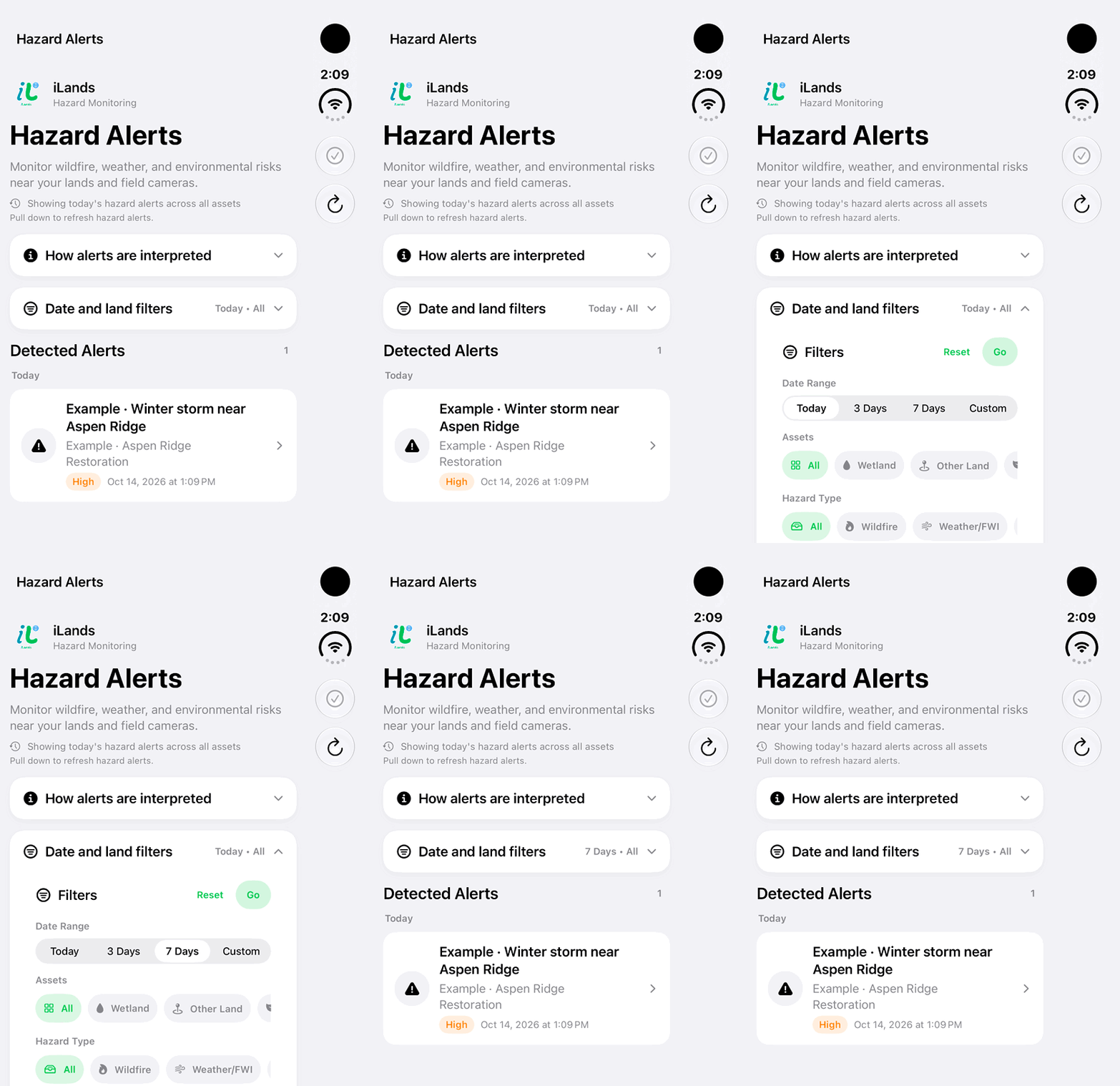
Walkthrough paused.
Follow the written steps or select Play walkthrough to watch the example.
Choose a date window for Hazard Alerts. This example changes Today to 7 Days with the native controls; the displayed alert is fictional.Open the looping GIF
Follow along
One step at a time.
Read an alert with its monitored place, time and source. A saved alert is a record to interpret, rather than proof of current conditions.
Refresh the monitored feed
Open Hazards. In Hazard Alerts, choose Refresh hazard alerts. Monitoring uses recorded lands and field cameras with usable locations.
Narrow the view
Open Date and land filters. Choose Date Range and relevant land filters, then tap Go. Available date choices include Today, 7 Days and Custom.
Read the detail
Open an alert. Review Headline, Summary, Hazard Details and Recommendation where available. Check source information and provider timing rather than treating the saved record as a live bulletin.
Follow the source
Use the official source link where available to check current status. Older saved alerts may explicitly lack additional provider details. Review the alert’s read state after opening it.