
Save and open an iLands Map File
GIS files
An .ilmap is a read-only snapshot of selected map content. Save it, inspect it in iLands or open it locally in a browser.
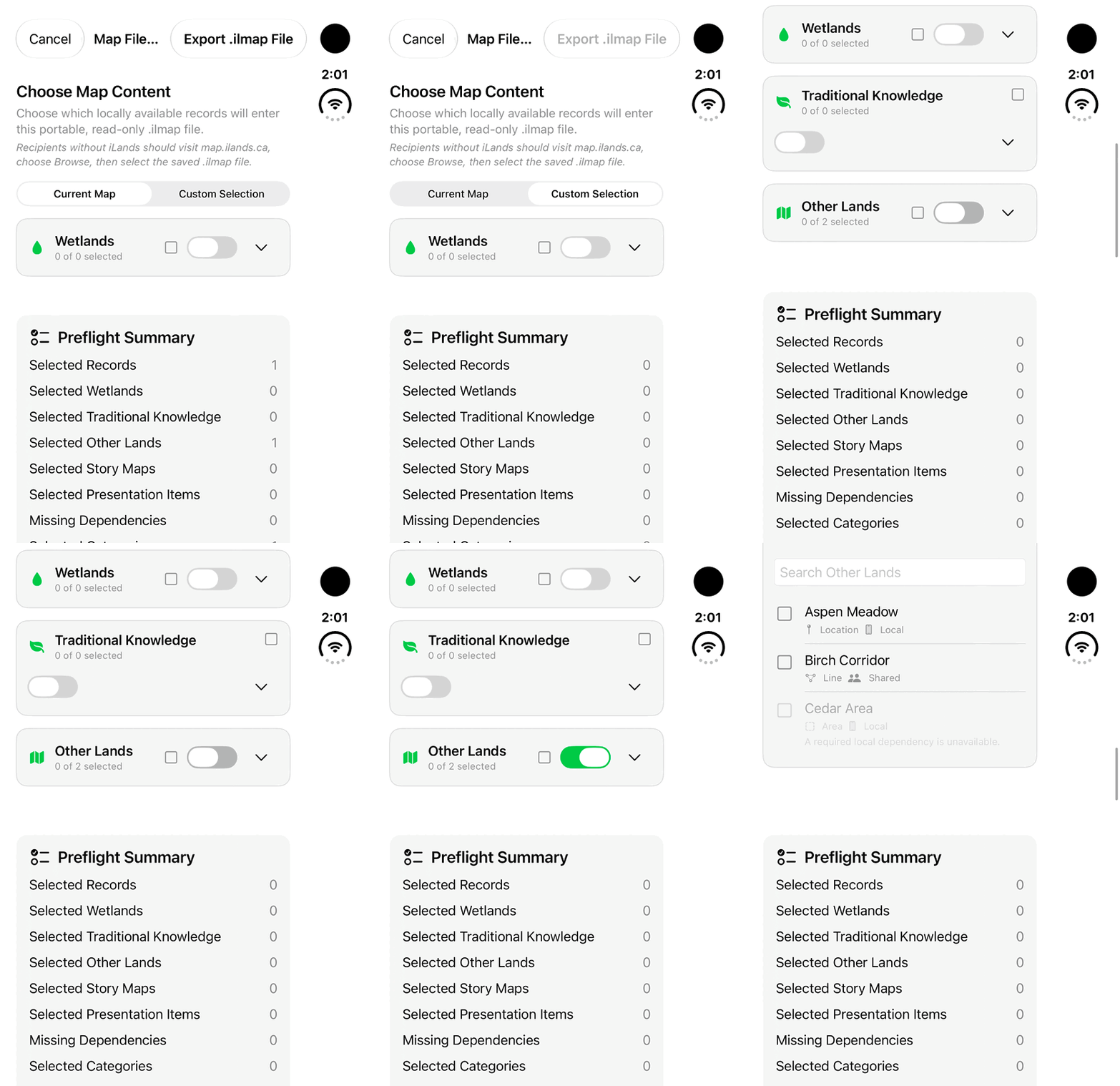
Walkthrough paused.
Follow the written steps or select Play walkthrough to watch the example.
Watch Custom Selection and the Other Lands controls in Map File Export. Follow the steps to review included records and save a package you have permission to share.Open the looping GIF
Follow along
One step at a time.
An .ilmap is a read-only snapshot of selected map content. Save it, inspect it in iLands or open it locally in a browser.
Start the export
Open Map Source → Save Map File. In Map File Export, start with Current Map or Custom Selection.
Review included content
Review individual lands, cameras, Story Maps and Presentation Canvas items. Check Media and 3D Options and resolve missing-content prompts. Forms responses and Site Twins are excluded.
Save the package
Choose Export .ilmap File, name it and select a location in Files. Share that saved file with the intended recipient.
Open it in iLands
Choose Map Source → Open Map File and select the package. Shared Map displays the snapshot. Return to My Map for live account records.
Open it in the browser
At map.ilands.ca, choose Browse and select the local .ilmap. Inspect included features and media; use Play Story Map when included. The viewer does not edit or synchronize source records.